Saturday, 24 February 2018

How can we add our bank account to WhatsApp and get started with payments

  1. Go to Settings -> Payments inside WhatsApp.
  2. In the Bank Accounts sub-head, select the Add New Account option.
  3. Tap Accept and Continue if you agree with the terms.
  4. Tap the Verify via SMS and follow the prompts to send an SMS to start the linking process.
  5. On the next screen, select the bank whose account you want to add.
  6. If you have an account (or multiple accounts) linked with the number that you just sent the SMS from, you will be presented with your account (or accounts) from that bank.
  7. If everything goes smoothly, you will see the UPI Setup Complete screen.
You can repeat these steps to add multiple bank accounts to WhatsApp. If you have multiple accounts added, you can designate one of them as the primary account (by default the account you added first).

How to send money via WhatsApp Payments

You must remember that the WhatsApp payment feature works only if the recipient has setup their bank account within WhatsApp – send this guide to your friends and family to help them get started! You can also send money to individual group members in a group chat, provided they have enabled the Payment option. Moreover, you cannot pay money to verified business accounts (such as BookMyShow or MakeMyTrip) because the service is only peer-to-peer (i.e. person to person).
  1. Open the chat of the WhatsApp contact to whom you want to send money.
  2. On Android, tap the Attach button. If you are on iPhone, select the Plus button.
  3. To send money, just tap on Payment, and enter the amount you want to send. You can also add a note to the message if you want.
  4. To authorise the payment, just enter the UPI PIN of the bank account from which you are trying to send money.
  5. Once the money is sent, the amount (and the text note, if any) will show as a message as part of the conversation.
As you can see above, the process is quite simple and takes only a few taps to complete. If you want to switch between accounts, you just need to tap on the bank account while sending money and you will see the list of linked accounts to switch between.
#WhatsApp will maintain a log of all your transactions – the money you sent and the money you received – using the #Payments option under Settings. To check the log, just go to #Settings, tap on Payments and select the View History option. #vasudevparasara
This is WhatsApp’s first attempt on the digital payments front, which has been dominated by Paytm in India. The Facebook-owned app has not officially announced this feature yet, and kept it in beta mode so far, meaning only a small segment of its more than 200 million users can access it presently. Google’s Tez, Paytm’s Inbox, and the numerous UPI services managed by banks themselves have made it pretty easy to transfer money to one another.
Friday, 20 January 2017

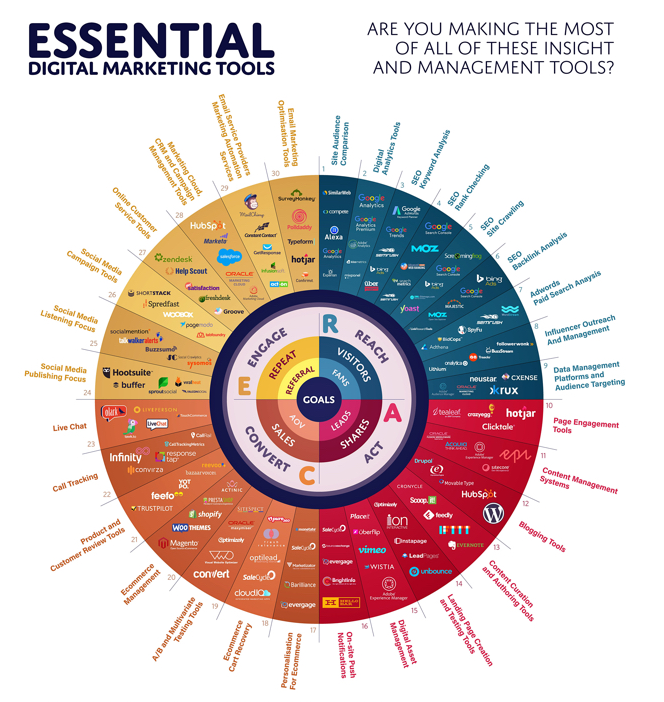
2017 Essential Digital Marketing Tools


What Are the Essential Digital Marketing Tools to Use in 2017?


The acknowledgment and execution of procedures, overseeing everyday, estimation comes about and the requirement for coordination between various individuals makes work in a computerized showcasing office is an exceptionally complex assignment. Luckily, available there are a wide range of advanced showcasing apparatuses that can address our issues and make our lives much simpler.

Essential Digital Marketing Tools ! digitalcot

Monday, 19 December 2016

Twitter tips for business

To maximize the perks of Twitter marketing can bring, here’s what every  business owners have to do:

1. Sign up for Twitter
2. Follow important people related to your business
3. Setup a landing page redirecting to your website
4. Promote or tweet quality contents only
5. Create a marketing strategy


twitter tips-digitalcot


There are many online activities that you can do with Twitter, such as:

posting regular promos and special offers for your business

answering inquiries to customer questions

posting regular website updates

notify followers about your latest business activities

Sunday, 18 December 2016

19 Essential Facebook Fan Page Tips

19 Essential Facebook Fan Page Tips


1) Don't create a dummy account for your business page
2) Add a recognizable profile picture.
3) Choose an engaging cover photo.
4) Optimize the descriptions of your profile picture and cover photo by adding links.
5) Bonus: Integrate your profile picture with your cover photo.
6) Add a call-to-action (CTA) button to your cover photo.
7) Customize your Facebook Page with apps -- then organize your tabs
8) Fill out your 'About' section with basic information, and add company milestones. 


facebook fan page

9) Post photos and videos to your Timeline. 
10) Post other content types as well.
11) Promote lead-gen and non-lead-gen content. 
12) Determine the ideal timing and frequency for your posts.
13) Leverage Facebook's publishing and targeting tools.
14) Pin important posts to the top of your page. 
15) Decide whether you want Facebook fans to message you privately. 
16) Monitor and respond to comments on your page.
17) Promote your page to generate more followers.
18) Measure the success of your Facebook efforts.
19) Try some Facebook advertising to amplify what works. 

Thursday, 15 December 2016

How to Measure Return on Investment


It‟s difficult to say how each company should quantitatively measure their social media efforts without knowing more about the company, but in general, anytime a company can convert metrics and analytics into dollars is usually the best approach. This is easier to do with sales and customer services usages, while more difficult to do with public relations, marketing, and research and development usages. Here are some metrics to keep in mind when trying to calculate the ROI of various services:


digitalcot-smm


Email

Landing page conversion percentage

# of opens for each email

# of clicks of links in each email

# of email subscribers who purchase something


Blogs

Total # of posts or average page views per post

Traffic overall or per post via a service like Google Analytics

Subscriber counts via an RSS service like Feedburner

Comment counts per post (measures engagement)

Demographics information via a service like Quantcast


Facebook

# of Fans of members in your group Percentage of items shared on Facebook Percentage of traffic driven to website Facebook fan page analytics

Twitter

# of followers

# of retweets of all links

# of people who respond (@) to questions, polls, etc. Percentage of traffic driven to website

Became a trending topic or not


StumbleUpon

# of reviews for submitted item Traffic driven to site

Made it to the front page or not

# of people who subscribed or signed up after landing on the page


Digg

# of Diggs

# of comments on the Digg site Traffic driven to site

Made it to the front page or not

# of people who subscribed or signed up after landing on the page


Case study to calculate ROI: Naked Pizza

Naked Pizza is a New Orleans-based healthy pizza join that specializes in its low-calorie slices that weigh a fraction of a normal pizza slice. The company built a 4,300 person following on Twitter in 2.5 months. Though the company is local, Naked Pizza is still able to use Twitter to advertise within a 3 mile radius.

Using analytics tools to find entrance rates, Naked Pizza has found that, on average, 20% of sales come from users who enter the site via Twitter.Furthermore, during one particular advertising blitz on Twitter, the company found that 69% of their sales for that day first came to the site via Twitter‟s website. The normal 20% of sales per day are sustained as long as CEO Jeff Leach tweets – which he does at least once and up to 15 times every single day.

Because Naked Pizza was able to change their analytics metrics into dollars, the company was able to make an important business decision: to change their company sign, which originally had an order phone number on it, to their Twitter handle. By the way, Naked Pizza gets an average of 35,000 people who drive by every day, and is working to become a national chain.


How to Monitor Your Company’s Reputation

There are a few tools every company should use to monitor what people are saying.

Google Alerts – This is a Google service that sends you an alert based on the keywords you set up.

OneRiot or Twitter search– OneRiot is a real-time search engine that captures keywords on Twitter and social bookmarking sites. Search OneRiot for keywords about your company and respond to complaints or concerns about your product or service, or if your company is focused specifically on Twitter, Twitter has its own real-time search engine for just tweets.

Using these tools with the appropriate keywords will catch 99-100% of everything people are saying about your company, so you can respond appropriately and protect the brand.


digitalcot-smm


Dealing withBad Publicity

There are always situations where an experiment goes awry or someone just doesn‟t like your company, product, or service and wants to complain about it in a public forum. There are a few ways your company can deal with bad publicity on social media: calmly dispel it if the information is false, put a positive spin on it if the information is true, or ignore it if the information is purely opinion. Sometimes drawing attention to a dissenter is worse than allowing them to have and speak their opinions.

Here are some tips for responding to bad publicity:

Respond quickly to help control the message Response should be short and to the point

Response should seem impromptu, but not unprofessional Response must be warm, genuine, and authentic
Response must be in the right medium – don‟t use social media to respond to shareholders or mainstream media

It helps to have a relationship with your customer prior to the incident

Use the right person in your company to respond to the incident – your company‟s CEO is not always the best or most appropriate choice

Here are some tips specifically for the video medium:

Use Vimeo instead of YouTube for branding purposes Memorize what you want to say and look directly at the camera

Don‟t let the ubiquity of the medium allow the video to look unprofessional – use good lighting, appropriate attire, and production makeup

Don‟t overproduce – professional videos look inauthentic

The shorter the better – viewers form impressions in the first 12 seconds

Don‟t become fodder for a junior comedian – people who know how to use video editing tools can remix the message to make fun of the entire video


Case Study on Reputation Management: Domino’s Pizza

In March 2009, two Domino‟s Pizza employees released a YouTube video of themselves coughing and sneezing on a customer‟s food. Within one day the video had over 1 million hits on YouTube.

In Chicago, Domino‟s local operating partner, going by Twitter handle @dpzramon, tweeted reassurances about the cleanliness and employee training standards of his Chicago stores within hours of the video gaining publicity. He also sent individual messages to all of his Chicago friends on Twitter with the same information, and asked them to retweet the information to all of their followers.

A day later, Domino‟s CEO released a three minute response video via YouTube. He used strong language, calling what his employees did a felony, and saying he was sickened by their actions. He also was not looking at the camera directly, which made viewers question whether he was reading cue cards.

As you might be guessing, one of these approaches worked extremely well, and one of them didn‟t. Chicagoans who had received messages from @dpzramon came away with the feeling that the situation was handled appropriately and that their Domino‟s

Pizza stores were well taken care of. In fact, Chicagoans wanted to buy pizza to support their friend @dpzramon.

The response to the Domino‟s CEO video was much different. People felt the video was too long, used too strong of language, did not seem genuine, and that the video seemed unprofessional. Viewers also criticized Domino‟s for not responding to the incident for


several days, and for using the wrong media to put out a message that was more aimed

at shareholders and the media than at Domino‟s Pizza customers.